For my last article, I was looking for a way to produce circuit diagrams that look a little more polished than scans of hand-drawn images.
There are a lot of tools out there for drawing schematics, like KiCad and Altium, schematics which can then be sent on to PCB manufacturers, but these seemed like overkill (and out of my price range in the case of Altium) for simple, analog circuitry like the kind I’m currently learning about.
There are also a few simple online tools, like Circuit Diagram, which work nicely and come with a library of different components, but I’ve always been disatisfied by drag-and-drop tools for creating software-architecture diagrams, and circuit diagrams feel no different. Even modestly complex diagrams become a pain to resize or shuffle around, and repetitive tasks can’t be automated.
I remembered an episode of Developer Voices that introduced KCL, a programming language designed to produce CAD models. This got me thinking that there must be a programming language that can produce 2D models as well. And indeed, there is.
Pic is a so-called “little language”, (which appears to be what DSLs were called before they were called DSLs?). More generally, it can be used to create diagrams, with primitives for drawing boxes, circles, arcs, lines, arrows and splines. From these primitives, arbitrarily complex diagrams can be created. And indeed, someone has devised a set of m4 macros, Circuit Macros, which expand into pic code.
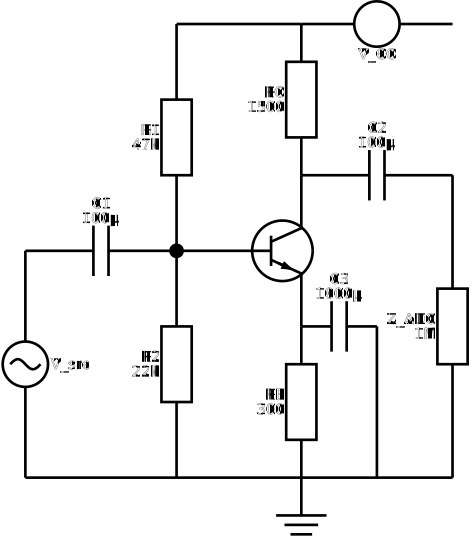
Here is an example diagram using these circuit macros for a common-collector amplifier:
.PS
cct_init
scale=2.54
linewid = 4.0
linethick_(2.0)

u = dimen_ / 4

C1: capacitor(right_ 4*u); {"C1" at last [].n "100μ" above }
J: dot
L: line right_ 2*u
Q: resized(0.5, `bi_tr', up_ 4*u,,,E) with .B at L.end

RC: resistor(up_ 4*u from Q.C,,E); {"RC" at last [].w rjust "1500" rjust }
RE: resistor(down_ 4*u from Q.E,,E); {"RE" at last [].w rjust "300" rjust }

ground
R1: resistor(from J to (J, RC.end),,E); {"R1" at last [].w rjust "47k" rjust }
R2: resistor(from J to (J, RE.end),,E); {"R2" at last [].w rjust "22k" rjust }

AC: resized(0.6, `source', from (C1.start, RE.end) to C1.start, S); {"V_src" at last [].e ljust }
C2: capacitor(right_ 4*u from Q.C); {"C2" at last [].n "100μ" above }
ZADC: resistor(down_ to (C2.end, RE.end),,E); {"Z_ADC" at last [].w rjust "1M" rjust }
line to AC.start
resized(0.6, `source', left_ from (C2.end, R1.end) to RC.end); {"V_CC" at last [].s below }
line to R1.end
C3: capacitor(right_ 2*u from Q.E); {"C3" at last [].n "1000μ" above }
line down_ to (Here, RE.end)
.PE
which is then “compiled” into the following SVG diagram:
Setup
The setup for these macros consists of three parts:
- The m4 macro processor, which turns out was already installed on my Mac,
- The circuit macro repo , pointed to by a
$M4PATHenv var, - An installation of dpic which I compiled manually and put on my
$PATH
Then the compilation process is pretty straightfoward, for SVGs:
m4 -E svg.m4 common-emitter.m4 | dpic -v > common-emitter.svg
More configuration options and a bunch of examples can be found on the circuit-macros website .
Pretty straightforward and it only took a few hours to get comfortable with the syntax. There were, however, a few pain points that arise from the fact that the circuit macros are not native pic code (a kind of DSL within a DSL).
Pain points
To get the macros working for SVGs on my system, I had to modify the definitions for the rlabel and llabel macros, by commenting out the SVG branches in the libcct.m4 file:
-define(`llabel',`ifsvg(`changecom(,)')dnl
-m4label(`$1',`$2',`$3',.n_,above_,`$4',`$5')`'ifsvg(`changecom(`#',)')')
+define(`llabel', `m4label(`$1',`$2',`$3',.n_,above_,`$4',`$5')')

-define(`llabel',`ifsvg(`changecom(,)')dnl
-m4label(`$1',`$2',`$3',.n_,above_,`$4',`$5')`'ifsvg(`changecom(`#',)')')
+define(`llabel', `m4label(`$1',`$2',`$3',.n_,above_,`$4',`$5')')
The same trick didn’t work for dlabel though. This little exercise in fixing the macro definitions shows that, without a proper AST, the macros have to be aware of the output of the language.
Secondly, the syntax for circuit macros is a little different from the underlying pic primitives. From our above example, here are the definitions for a capacitor and a line:
capacitor(right_ 4*u)
line right_ 2*u
Even though both are sharing the same underlying idea (define an object oriented to the right with a certain length) the syntax is slightly different.
Also notice that to resize a component, the target macro then needs to be passed as a parameter to the resized macro, changing the syntax again:
resized(0.6, `source', from (C1.start, RE.end) to C1.start, S)
Finally, and perhaps most importantly, while dpic outputs directly to SVG, I couldn’t find a way to get LaTeX-like labels in my diagrams, so that in the example above, appears as: Z_ADC. Coloring arrows as part of my labels was also equally difficult.
Not invented here!
The circuit macros and pic are a great first step and will help me a lot in creating professional circuit diagrams. However, some of the frustrations have me thinking: is it worth creating my own DSL?
To find out, I’m christening a new project diggy, with the following goals:
- learn how to write a programming language,
- a single, portable binary that can accept source files and output diagrams,
- components that can be defined within the language itself (no macros)
- component libraries,
- SVG output with simple MathML-based labels,
- a “here” object that represents the current point in the diagram (as in pic),
- semi-automatic layout where the user only has to specify the lengths of lines (wires, arrows) (similar to pic),
- allow referencing and connecting component terminals (as in pic),
- configuration objects for specifying color, line thickness, size etc.
- automatic calculation of diagram width/height
- variables
- simple flow control
And who knows, maybe this would be a good stepping stone to understanding KCL, Verilog and other programming languages that help us to describe the physical world!